

Block Neopets Advertisements in Mozilla Firefox
One of the major problems with Neopets is the large number of instrusive ads on the site. However, there is good news... you can block the ads! We're going to show you how to block those evil ads that Neopets throws your way, so you can have an ad-free Neopets experience. Please note that this tutorial is for Mozilla Firefox.
Now, in order to block the ads on Neopets we are going to use a Firefox extension named Adblock Plus. To download the extension, go here  and click the big "Add to Firefox" button. After installing the add-on, you may have to restart your browser (if so it should prompt you to do so automatically).
Back already eh? So you should have Firefox open with Adblock Plus installed now. We are going to get Adblock Plus to use subscriptions that will block the ads on Neopets (and just about anywhere else). When you click the link below, you should see a dialog like this:
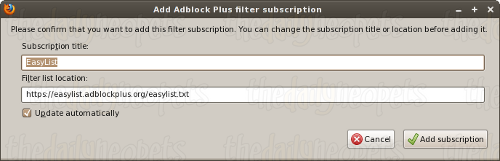
Just click okay on the dialog, and Adblock should automatically download and implement the filters.
Click here for TDN's filter list. (You'll also be subscribed to EasyList if you haven't done so already.)
Now, browse Neopets.com. If you followed this tutorial correctly, all the ads on Neopets.com (and many other sites as well) should be completely banished! Enjoy your ad-free Neopets experience!
Alerts
 The Snowager
Next sleep in 1h, 18m, 43s.
 Next Possible Wake
Jun 8: 12 AM/PM NST
Jun 9: 5 OR 6 AM/PM NST
Jun 10: 10 OR 11 AM/PM NST
Jun 111: 3 OR 4 AM/PM NST
 Obelisk War: Battle
Next cycle: 1d, 3h, 18m
Neopia Today


The Runway Contest

Recently At Forums
- It's Petpet Appreciation Day!
- Vote for the obelisk War! Round 339
- Monday, June 8
- Sunday, June 7
- Saturday, June 6