

Custom Hobbies
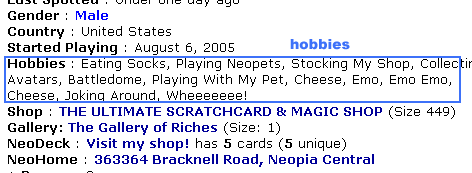
It's possible to put custom hobbies on your User Lookup instead of relying on the standard preset options. There's quite a few preset options, but if none are what you're looking for, here's how to add your own.
Internet Explorer, Safari, Opera
To get your own custom hobbies, go to the My Profile  page on Neopets and then paste the following coding into your ADDRESS BAR! You should completely replace the current URL with the coding below or it won't work.

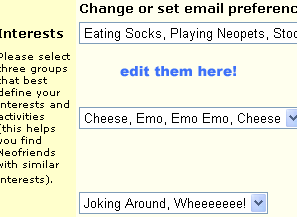
After entering that into your address bar and pressing ENTER, you will notice that the drop down menus change to text boxes! You can now input whatever hobby you like!
When you come back to the My Profile page on Neopets, it will revert back to drop down menus.
Firefox
To do custom hobbies in Firefox, you use the same script as in Internet Explorer, Safari, and Opera, just in a different spot. In Firefox, you need to create a bookmark, which you will then click on while you're on your My Profile page.
To create the bookmark, open your bookmark menu (either from the toolbar or by pressing ctrl+shift+b) and select a location for the new bookmark in the left sidebar. It can be in an existing folder, on the bookmark toolbar, wherever you like. Then, in the toolbar of the bookmark menu, click "organize" and select "New Bookmark". In the Menu that pops up, paste the same code in the above section into the "Location" field. This is the only field you need to fill out, but you may want to name the bookmark as well so you can find it easily. The other fields do not need to be filled out, but you may if you like.
To use the script, navigate to your profile page, then click the bookmark. You should now be able to freely edit your hobbies!
Google Chrome
Enabling custom hobbies in Chrome is a little different. In your Bookmarks menu, right-click and choose "Add Page..." Then, instead of pasting the text into the address bar at the top of your screen, paste it in the box in the "Add Page" dialogue labeled "URL." Navigate to your My Profile page and click this new bookmark. You should now be able to write custom hobbies! Special thanks to Christa Q for sending us this tip!
Just remember, like anything on Neopets, your hobbies are subject to filters. TNT has the right to refuse or remove anything you choose that is rude or offensive. So, keep your selections tasteful and have fun!
Alerts
 The Snowager
Next sleep in 1h, 18m, 50s.
 Next Possible Wake
Jun 8: 12 AM/PM NST
Jun 9: 5 OR 6 AM/PM NST
Jun 10: 10 OR 11 AM/PM NST
Jun 111: 3 OR 4 AM/PM NST
 Obelisk War: Battle
Next cycle: 1d, 3h, 18m
Neopia Today


The Runway Contest

Recently At Forums
- It's Petpet Appreciation Day!
- Vote for the obelisk War! Round 339
- Monday, June 8
- Sunday, June 7
- Saturday, June 6